Browsers Compared: Google Chrome Reviewed

84Google Chrome
Google Chrome is Here!
Well, it's finally here, Google's much-anticipated entry into the browsing world: Google Chrome.
Google Chrome is Google's latest shot across Microsoft's bow, and the browsing world's too. And I say this with all sincerity and without the least bit of hyperbole, but Google Chrome will forever change the evolution of browsers.
Okay, I know, it has only been 48 hours since the release of Google Chrome (as of the time of this writing), and I'm certain there will be plenty of opinions, but I predict that Microsoft, Mozilla, and Opera will all soon be mimicking Google's browser rather than the other way around.
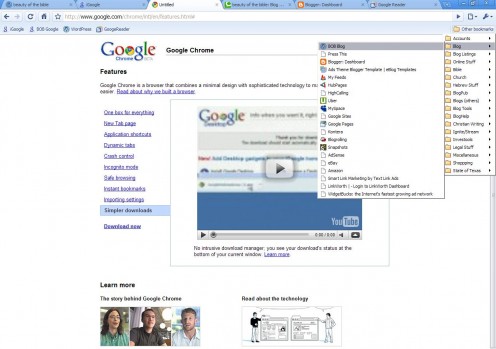
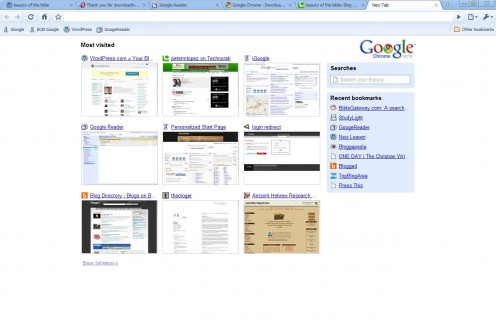
Google Chrome Screenshots
Google Info.
![]() | Amazon Price: $4.99 List Price: $26.00 |
![]() | Amazon Price: $10.92 List Price: $19.99 |
![]() | Amazon Price: $14.79 List Price: $24.95 |
![]() | Amazon Price: $9.42 List Price: $15.95 |
Chrome: A Quick Review.
Google Chrome is what Internet Explorer should have been. A clean, crisp browser with tab functionality, an intuitive interface, and that is fast. After my 48-hour test drive, here are key features that I like:
- Enhanced Tabbed Browsing: When you open a new tab in Chrome, the new tab appears but with a series of screen shots of your most-visited pages, a list of recent bookmarks, and a search box for a new search or to recall your search history.
- Search Options: One option that I have sorely missed since I stopped using Seamonkey's (f.k.a. Mozilla application suite) browser and started using Firefox full time was a single address bar for both web addresses and searching.
- Integration With Google Stuff: Admittedly, Firefox integrates quite well with all of Google's other stuff, iGoogle, Blogger, Picasa, etc. But,clearly Chrome will have the edge if it doesn't already.
Incognito Mode: No extra plug-ins or software required. Your privacy is protected.
No Download Manager: A simple status bar at the bottom of the browser is all there is and it is sufficient. No boxes, no extra junk, just a simple download status bar.
- Crash-Proof Browsing: Each tab operates independently, so if one page or application crashes (a pdf reader, for instance, crashed on me), the individual tab can be closed without having to close the whole browser.
Disclaimers:
1. Firefox: Until now, I used Firefox as my primary browser for everything (blogging, hubbing, shopping, paying bills, etc.). I love Firefox, but lately it has become bloated and slow.
2. Opera: I really, really wanted to migrate to Opera as my primary browser about a year ago, but I just couldn't do. Honestly, I think it was more about taking the time to import everything, and find comperable Opera widgets to Firefox add-ons
3. IE: I DO NOT like Internet Explorer. It's slow, it seems to crash far more often than any other browser, tabs take forever to open, and it annoys me to no end.
4. Chrome: I LOVE everything Google (virtually everything, I wish Blogger would have a landing page more like Wordpress.com, but still, most everything). Google stuff just seems to work well. So, I admit I probably started off a little biased.
Battle of the Browsers.
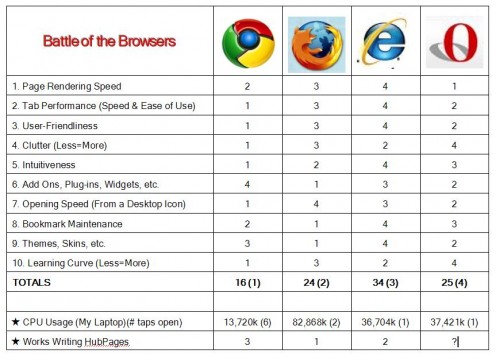
Here is my side-by-side comparison of the four major browsers (Chrome, Firefox, Explorer, and Opera).
This test is not scientific and no special scientific instruments or measuring devices were used other than my laptop. It is a mid-range Dell Windows XP notebook. I have no special skills or knowledge that would qualify me as an expert to make this comparison, other than I use browsers constantly.
This is my simple evaluation of how these browsers performed on my computer using tests that I thought might be important to the average user. I compared browsers in 10 different areas ranging from speed to user-friendliness. I rated performance 1-4 (1 being best, 4 being worst). Total lowest score wins. I included a couple of bonuses for CPU usage and HubPages functionality (although I'm sure this will be addressed over time). Pleae review my "Disclaimers" to the right.
On a scale of 1-10 (1 being, "I know how to turn on a computer, but that's about it," and 10 being Bill Gates), I am about a 7.5 for what that's worth. Enjoy!
Internet Browsers Compared.
Conclusion
I realize that there is an inherent bias in my testing methods. My Firefox browser has the following add-ons or extensions: Google Web Accelerator, StumbleUpon Toolbar, Clipboard Observer, Dictionary Tooltip, Clipmarks, Email This, and others I'm sure I have forgotten about.
I also realize that Chrome will probably not be as fast with a similar list of plug-ins, and I do love all of my little extras. I do not think, however, that the integration will be as slow and/or awkward. For example, the integration of iGoogle gadgets, whether developed by Google or individuals seems rather seemless. I trust (hope, really) that Chrome add-ons will work as well. Although, I reserve the right to revise this review should they not.
Otherwise, Google Chrome is great. I love it, and I assume you wil too.
More Google Stuff
|
|
Cult Internet T-Shirts Choose From 5 Designs Cotton Men's Honey Badger Video
Current Bid: $7.99
|
|
|
LCD Internet USB Voip Ip Phone Headset Telephone PC SKYPE MSN YAHOO GOOGLE AIM
Current Bid: $9.98
|
|
|
Cult Internet T-Shirts Choose From 5 Designs Cotton Men's Honey Badger Video
Current Bid: $7.99
|
|
|
LCD Internet USB Voip Ip Phone Headset Telephone PC SKYPE MSN YAHOO GOOGLE AIM
Current Bid: $9.98
|
|
|
Cult Internet T-Shirts Choose From 5 Designs Cotton Men's Honey Badger Video
Current Bid: $7.99
|
Google Stuff
![]() | Amazon Price: $4.99 List Price: $26.00 |
![]() | Amazon Price: $19.95 |
![]() | Amazon Price: $0.00 |
![]() | Amazon Price: $10.92 List Price: $19.99 |
![]() | Amazon Price: $14.79 List Price: $24.95 |
CommentsLoading...
Thanks for the information, Peter. I am a constant researcher/browser and have need of an accurate and fast system. I have to admit, though, I do much better with the research end than I do with understanding how this stuff works... so, at the risk of sounding really stupid, okay, I am stupid so tell me; do I download this into my current Firefox system? Is it free? I signed up for Stumbleupon, but I have yet to figure that out- are you saying Stumble won't work with Chrome? Should I wait until there is a new system that does? I am one of those users who just wants to use the stuff, i.e., I let others figure out how to get it installed. Yes, I am one of those moms whose kids know more about it, what can I say? Computers weren't even invented when I was in high school...
Thanks for the comparison! I've downloaded it and I just love it! It's clean, it's simple and it's fast. BUT...there's always a problem when you want to post a comment on Hubpages - very like Opera which I also love!
Peter,
Thanks for some great information.
Too tied up until Tuesday then Iwill play. What a way to go.
Again thank you
Oooooops sorry! I didn't realise you'd rated it for HubPages too! Yes, I hope soon - right now, I need to open my IE browser when I have to post :(
I love it! and as i always say, each browser is different with different features and the sooner you can work out which ones work best where, then use these as and when!!
Variety is the spice of life and i quite like the new variety which i have added to my huge browser collection!:)
I installed the chrome also, It looks great and is working well. But, you know, without addon plugins, it can not beat firefox now.
I like it. It gives more real estate to the page and less to itself. And the self-populating favourites on the startup page is a great feature.
I really love Firefox and find it is so helpful I couldn't do without it now. Thanks for this page on the new Chrome as I have been wondering what it is and if it is worth looking into! :)
cool, thanks for the hub. I had been wondering about the google browser since I heard of it recently.
Thanks I'll download and give it a try.
Thanks for this helpful hub! Guess I will wait until it works a bit better with HubPages, though. Then again, maybe not. Now you have me curious...
I ended up uninstalling it. I'll get it back when they have adblocker and a couple of other features. Speed was great, but when I shut it down and started it back up, it lost all my bookmarks, and wouldn't let me import them from either IE or FF. It never would let me have FF's bookmarks.
I'll try again once they're out of beta...which may be awhile, since Gmail has been in beta for what....8 years or more?
Great hub very informative and thorough. Thanks.
Thank you for your information. Actually I am thinking of Google Chrome to download and use it.
It garnered a low score compared to the others :( . although It has its strong points. maybe I'll give it a test myself then see if it fits to my liking.
I like what I’ve seen (and used) so far too. Not everything is intuitive, though. I added a bookmark for HubPages on the Bookmark bar and then it took me quie some time to reveal that bar , it didn’t automatically appears after the first favourite landed on it.
While this is only the first version of Google’s browser, Microsoft are also set to bring out a new browser. According to Microsoft, Internet Explorer 8 will give the user more internet preferences and in particular give them more control over their personal data, perhaps keeping the edge on Google’s newest venture.
Really good hub! Check out <a href="http://www.lifeaftergoogle.com">google sucks</a>
I tried all but I love Firefox browser because there are lots of add ons, which other browsers don't have plus excellent option of restore.
I have never even heard of all these other browers except google, thanks for the info.
Just downloaded Chrome last week. Been having problems with my Hub layouts ever since. Bad layout or problems = lower hub scores. What? Me worry? Nah.
Everything else is good.
Except this ONE THING.
How do I log stuff as a new favorite?
Seems like everything stays logged in like forever. Every page you hit. True/false?
I got a blogger blog. Took forEVER to click all the doo-dads and gizmos.
So. Dork that I am. I still need to link the blog with my hub. Do I understand how? Nope.
HubCrafter
Technology and the users. I guess its up to us which to choose. However, this post has been helpful, so Thanks!
Chrome is best but they have some issues,they need t fix that if they want it to be on top..


dafla 3 years ago
Thanks! I've been thinking of downloading, but this made up my mind. I love my plugins too, although I have but two, but I'm sick of FF hanging up after browsing awhile. Very aggravating to have to sit and wait for everything to finish loading so you can shut it down.
Chrome is still in beta, so I'm sure that those add-on writers are now working feverishly to get some out there. I'm sure that won't be too hard, since they already have a ton compatible with other Google stuff, like Blogger, so it shouldn't be a big leap to make them fit into Chrome.
I love all things Google, except Google Sites, and I can't wait to try Chrome.